Downloading and Importing FTDNA
Downloading the Data Files
FTDNA relatives, segments and ICWs can be gathered with the DNAGedcom Client for a nominal monthly fee. The advantage is that the Client provides a unique identifer for each relative that is not available in the FTDNA direct download.
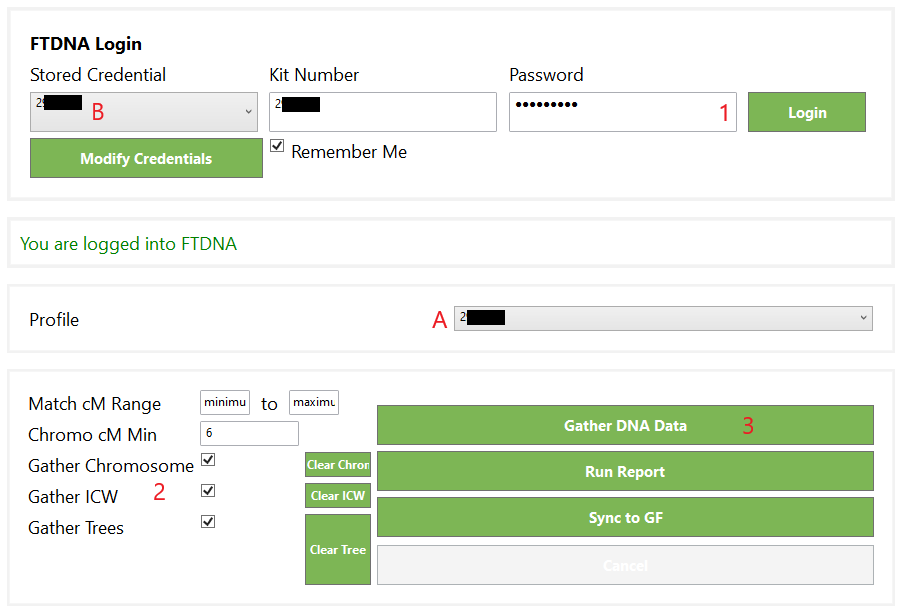
From within the Client, select “Gather” and then “Family Tree DNA”
- Enter Kit No and password, then click Login*.
You can choose to have the client remember your log in details if you desire.
Once successfully logged in, change the drop down at "A" to the name of the kit. Not changing the drop down to the name will result in wasted time and empty files. - Select the options you wish to gather; default settings are shown in the image.
- Click on the Gather DNA Data button. When complete, it will write up to four files depending on your settings
* If you receive an error message implying that your log in details are incorrect, DNAGedcom has advised to do nothing, wait for about 5 minutes, and try again. It should work on the second attempt. This is due to an FTDNA process.
Gathering matches for the very first time can take many hours, or even days depending on how many matches you have and how many options you have ticked. Be patient.
If you have done a download within approximately a week, the gathers may appear to be small, but it will be scanning new matches only, however the resulting file should still contain all the data.
Importing the Data to GDAT
Use the DNAGedcom Extract Tool to export data from the DNAGedcom.db file to a format readable by GDAT.
- Copy the DNAGedcom.db file to your documents folder
- Use File-Open Database to select the DNAGedcom.db file to use
- Use File-Output Location to select the folder where results are to be written
In GDAT, you will need to activate the DNAGedcom Extract Templates, setting the source for each template to show FTDNA.
- Import the "matches" file for the profile through the "Relatives" import template.
- Import the "chromosome" file for the profile through the "Segments" import template..
- Import the "ICW" file the profile through the "ICWs" import template.
- (Optional) Import the "trees" file for the profile through the "Trees" import template.
It is possible that not all tree records will be imported. If GDAT cannot determine the path, it will ignore those records. The underlining of a Relative’s name will indicate an Ahnentafel is present in that relative’s record.